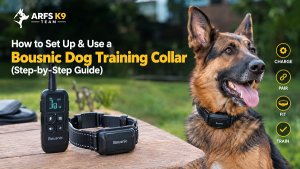
How to Set Up & Use Bousnic Dog Training Collar
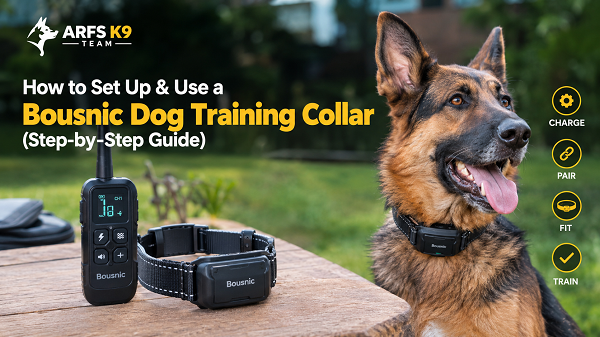
To set up a Bousnic dog training collar, fully charge both the remote and the receiver for about 4 hours before first use. Then pair them and fit the receiver so the contact points touch your dog’s skin. Next, find your dog’s recognition level: start at the lowest setting and move up until you see a small reaction, like looking around, scratching at the collar, or flicking an ear. Start with beep or vibration, use static only as a last resort, and keep sessions short and positive, around 10 to 15 minutes.
Table of Contents
- What’s in the Box: Meet Your Bousnic Collar
- Before You Start: Is This Collar Right for Your Dog?
- Step-by-Step Bousnic Collar Setup
- Beep, Vibration, and Static: How the Three Modes Work
- Let Your Dog Get Used to the Collar First
- How to Find Your Dog’s Recognition Level
- Training Basics: Sit, Come, Stay, and Problem Behaviors
- Safety Rules Every Owner Must Follow
- Bousnic Collar Troubleshooting
- Why You Can Trust This Guide
- FAQs
- Final Thoughts
Introduction
You just unboxed your Bousnic dog training collar. The remote has a handful of buttons, the manual is tiny, and one question keeps nagging you: “What if I do this wrong?”
That worry is a good sign. It means you care about your dog. Most problems with training collars don’t come from the device. They come from skipping steps: a bad fit, a level set too high, or a collar used before the dog understood the command.
In this guide, you’ll learn how to charge, pair, and fit your Bousnic collar. You’ll also learn how to find the right level for your dog, how to teach basic commands, and how to fix the most common problems. I’ll also tell you the honest truth about safety, science, and the law, because most guides skip that part.
What’s in the Box: Meet Your Bousnic Collar
Every Bousnic kit has two main parts that talk to each other.
The Remote Transmitter
The remote is your control center. It has a screen that shows the mode and level, plus separate buttons for each mode. Many models also have independent buttons and a security lock that prevents accidental activation. Some remotes support two dogs at once with dual-channel switching.
The Receiver Collar
The receiver sits on your dog’s neck. It has metal contact points that deliver static stimulation, plus a vibration motor and a beep speaker. Most receivers are waterproof. Many models are rated IP67 or IPX7, though the remote on some models is not waterproof.
Which Bousnic Model Do You Have?
Bousnic sells many models, and the specs differ. Check the model number on the back of your remote, then compare:
| Model | Advertised range | Receiver waterproofing | Notes |
|---|---|---|---|
| RS2-style newer models | Up to 3,300 ft | IP67 | Made for dogs 5 to 120 lbs |
| P-Collar 670 | About 3/4 mile | IPX7 (remote not waterproof) | Static levels 0 to 16, USB-C charging, works with up to 2 collars |
| 650B | Check your box | IPX7 | Fits dogs 8 to 120 lbs, neck sizes 6 to 27 inches |
Some manuals list static levels up to 99, while others stop at 16. That’s why I always tell owners to read their own model’s manual too.
A reality check on range: the number on the box is a best-case figure. Terrain, weather, vegetation, and other radio devices all reduce the real range. Expect much less in thick bush or between buildings.
Before You Start: Is This Collar Right for Your Dog?
Ever bought a tool, then realized you needed to learn when not to use it? Let’s do that homework first.
Age, Weight, and Temperament
- Age: Bousnic’s own guide advises against use on dogs under 6 months old or under 8 lbs.
- Weight: Most models cover roughly 5 to 120 lbs. Check your manual.
- Aggression: The manual is clear that the collar is not for aggressive dogs, because it can lead to serious injury. If your dog bites or lunges, talk to a certified behavior professional first.
What the Research Says (Honestly)
Here’s the part many sellers leave out. Bousnic’s guide calls the collar safe and gentle. Independent research is more mixed.
- One study, Cooper et al. (2014), found evidence of compromised welfare in dogs trained with shock collars, even when experienced trainers handled them.
- Another study, China et al. (2020), found shock collars were less effective than reward-based training.
- Major veterinary groups, including the American College of Veterinary Behaviorists and the American Veterinary Society of Animal Behavior, recommend reward-based methods only.
I’m a working-dog handler, so I’ll be straight with you: many professionals still use e-collars for off-leash reliability. But most of us use them at very low levels, after a lot of reward-based groundwork. If your dog is anxious, fearful, or new to training, try reward-based methods first. Our guide to dog training collar types compares your options.
Check Your Local Laws
This matters because rules differ a lot from country to country:
- Wales has banned electric shock collars since 2010.
- England: the government announced a ban, but the Royal Kennel Club says use and sale are currently not prohibited there. Laws shift, so check before you buy.
- Europe: a veterinary association lists bans in Denmark, Norway, Sweden, Austria, Switzerland, Slovenia, Germany, and Finland.
- Australia: the Capital Territory, Queensland, South Australia, and New South Wales have banned e-collars.
- United States: Dog training isn’t regulated in the US or Canada, so rules depend on your state or city.
If you live where static collars are banned, a vibration-only or beep-only collar may still be an option. Check with your local authority first.
Step-by-Step Bousnic Collar Setup
Step 1: Charge Both Units
Charge the remote and the receiver before you do anything else. Charge both for 4 hours the first time. Later charges usually take 2 to 3 hours. Use a standard 5V phone charger or power bank. The adapter usually isn’t included.
Some quick charging facts:
- On the P-Collar 670, the light is red while charging and turns green when full.
- Charge only when the battery is low. Excessive charging can shorten battery life.
- Charging can be slower below freezing.
- Put the rubber cover back on the port after charging. Water in the port is a top cause of failures.
Battery life is good. On the RS2, the receiver can last up to 15 days in working modes, and the remote more than a month.
Step 2: Pick the Right Contact Points
Contact points are the metal prongs on the receiver. Choosing the wrong ones is the number one reason owners say “the collar does nothing.”
- Short coat: use the short points.
- Long or thick coat: use the long points.
- Very thick coat: on some models, install the contact spring sheet.
Screw them on firmly. If you use silicone caps, fit them over the points as the manual shows. Remember this rule: without direct skin contact, there’s no static stimulation.
Step 3: Pair the Remote and Receiver
Most kits arrive already paired. If yours isn’t, or the link drops, re-pair like this on the RS2:
- Charge both units and turn them off.
- Turn on the remote.
- Press and hold the receiver’s power button until the light flashes rapidly.
- Within 10 seconds, press any mode button on the remote. The light stops flashing when pairing works.
On the 650B, you hold the receiver’s power button for about 3 seconds before pressing a remote button. Bousnic models differ slightly, so follow your own manual.
Step 4: Fit the Collar Correctly
Turn the receiver off before fitting it. Then:
- Place the receiver so the contact points sit underneath, touching the skin.
- Tighten the strap until the receiver doesn’t spin or bounce.
- Check the fit with a finger under the strap.
Quick answer: How tight should a Bousnic collar be? Snug enough that both contact points touch skin and the receiver can’t rotate. Loose enough that you can slide one finger under the strap. Some Bousnic manuals say one to two fingers, so check yours.
Recheck the fit after 10 minutes. Dogs relax, necks shift, and collars loosen.
Step 5: Test It Without Your Dog
Many kits include a test light tool. It confirms the static is working before you put the collar on your dog. The higher the static level, the brighter the light glows. Turn everything on and hold the tool across the two contact points. Press the static button and check the glow.
Never test static on your own hand or neck, and never on anyone else.
Beep, Vibration, and Static: How the Three Modes Work
Bousnic collars have three modes. Think of them as a ladder.
- Beep: an audible tone. It’s often used as an initial warning or a positive signal.
- Vibration: a tap on the neck. It works well as a stronger cue for dogs that respond to touch. Some dogs with hearing loss respond best to vibration.
- Static (“safe shock”): an electrical stimulation. Bousnic says to use this cautiously and only as a last resort.
Why the order matters: Bousnic’s guide explains that if you use vibration before static, your dog learns that static might follow the vibration. Then the vibration alone can stop unwanted behavior.
Here’s my tip from the field. Many owners never need the static button at all. If your dog reliably responds to vibration paired with a reward, you can stop right there. It’s the gentlest route, and it’s often the most reliable.
Let Your Dog Get Used to the Collar First
This is the step almost everybody skips.
Most dogs feel uncomfortable wearing the collar at first. Don’t give any commands until your dog has settled with it, which usually takes several days.
Here’s how I do it:
- Fit the collar with the receiver turned off.
- Let your dog wear it during meals, play, and walks for short periods.
- Pair the collar with good things: treats, toys, and attention.
- Take it off when the session ends.
If your dog scratches at it, freezes, or hides, slow down. A dog who links the collar with stress will learn nothing good.
How to Find Your Dog’s Recognition Level
The recognition level is the lowest setting where your dog notices the stimulation. It’s not a correction level. It’s a “hey, I felt that” level. Getting this wrong is the top reason dogs panic or ignore the collar.
Bousnic’s guide puts it this way: start with vibration first, and use static as a last resort. Here’s the process:
- Put the collar on and let your dog relax.
- Start at the lowest level and press the stimulation button.
- If there’s no reaction, repeat the same level several times before moving up.
- Watch for tiny signs: an ear flick, a head turn, a scratch at the neck, or a curious look.
- Stop the moment you see one. That’s your dog’s level.
Red flag: Your dog should not bark or panic. If that happens, the level is too high. Go back one level.
What If Your Dog Never Reacts?
Work through this checklist:
- Check the fit. Use the longer contact points if your dog has long or thick fur.
- Confirm skin contact. If it’s still not working, you may need to trim the hair around the contact points.
- Run the test light to make sure the receiver actually fires.
Write your dog’s number on tape and stick it on the remote. Levels change with excitement. A calm dog in the living room may notice level 3, while the same dog chasing a squirrel may need more. Always start at the recognition level and only move up if you really must.
Training Basics: Sit, Come, Stay, and Problem Behaviors
Your collar doesn’t teach commands. You do. The collar just makes the timing clearer. Before you use it, make sure your dog knows what the words mean. Our list of essential protection dog commands is a solid foundation.
Leash rule: Never clip a leash to the receiver. Put a separate non-metal collar above it and attach the leash to that. A leash pulls the contact points hard into the neck.
Teaching “Sit”
Bousnic’s guide breaks it down like this:
- Fit a separate collar and a 10-foot leash.
- Hold the leash and remote in one hand. Keep the other hand free to guide your dog.
- Press and hold the stimulation button at your dog’s recognition level, and say “Sit” right away.
- Release the button the moment your dog sits, then praise.
- Release your dog and play. Repeat.
The dog learns something powerful here: “I can turn this feeling off by sitting.”
Teaching “Come”
- Wait for your dog to walk away from you.
- Press and hold the button at the recognition level and say “Come.”
- Guide your dog gently in with the leash.
- Release the button the second your dog steps toward you. Praise like crazy.
- Back away as your dog runs to you. Keep the energy high.
Once your dog comes reliably, Bousnic suggests you give the “Come” command with no stimulation and keep praising. That’s when the training starts to stick.
Teaching “Stay”
Use a bed or mat as the “place.” Walk the edge of the bed without speaking. If your dog steps off, press the button and say “Stay” until the dog is back on the bed. Praise, wait a few seconds, then release calmly.
Fixing Jumping, Digging, Chasing, and Trash Raiding
Bousnic’s guide covers four common problems. The core ideas:
- Jumping: Press the button as your dog’s paws leave the ground and give a “Sit” command. Release when the dog sits. Make sure your family stops rewarding jumping too.
- Digging: Ask why first. Give shade, water, exercise, and toys before you correct. If you still correct, do it in silence from out of sight, so the dog links the feeling to digging and not to you.
- Chasing: Never let your dog off leash until he knows “Come.” Keep the dog on a leash strong enough to stop him.
- Trash raiding: Remove the temptation first. Then correct only while the dog’s mouth touches the item.
For digging, chasing, and trash raiding, the guide says to use a level one step above your dog’s recognition level.
A 2-Week Starter Plan (My Suggested Schedule)
This is my own timeline, not from Bousnic. Adjust it to your dog.
| Days | Focus | Goal |
|---|---|---|
| 1–3 | Wear the collar, power off | Dog ignores the collar |
| 4 | Find the recognition level | Small reaction, no panic |
| 5–7 | “Sit” on a 10-foot leash | Dog sits on cue at home |
| 8–10 | “Come” on leash | Dog turns and runs to you |
| 11–14 | “Stay” plus new locations | Dog responds around mild distractions |
Keep each session to 10–15 minutes. If your dog has a bad day, drop back a step.
Want a bigger training roadmap? My e-book, Beyond the Bark, is a practical breakdown of the techniques, mindset, and structure professional handlers use to build obedient, confident, and dependable dogs.
Safety Rules Every Owner Must Follow
Skin problems are the top e-collar injury I see. They’re almost always preventable.
Watch Wear Time and Rotate the Receiver
- Daily limit: Bousnic says not to leave the collar on for more than 12 hours a day. Its training guide adds that it’s meant for active training sessions and shouldn’t be worn constantly.
- Rotate: Reposition the collar on the neck every 1 to 2 hours when you can.
- Remove overnight. Take it off when you leave your dog unattended.
Understand Pressure Necrosis
These sores aren’t burns. They’re pressure sores caused by constant contact and poor monitoring. They look like bedsores. A collar that’s too tight causes them, and so does a collar that’s too loose and rubs the same patch. Check your dog’s neck daily for redness.
If you see irritation, stop using the collar for at least 48 hours. If it lasts longer than that, see a vet.
Follow the Time Limits
- Never press vibration or static for more than 10 seconds continuously.
- Bousnic’s guide adds that static should be limited to 3 seconds at most, and shorter for smaller dogs.
- If your dog vocalizes or panics, the level is too high.
Other Must-Dos
- Train one behavior at a time. Moving too fast confuses your dog.
- Be consistent. Use the same level for the same behavior.
- Don’t use the collar when your dog or the collar is wet. That’s what the RS2 quick-start guide says, even though the receiver is rated waterproof. Follow your model’s manual.
- If your dog reacts with fear, redirect to an easy command like “Sit” and reward.
Bousnic Collar Troubleshooting
Something not working? Try these fixes before you contact support.
| Problem | Likely cause | Fix |
|---|---|---|
| No response from receiver | Not paired, not charged, or off | Check power and charge, then re-pair. |
| Weak or inconsistent stimulation | Poor skin contact | Adjust the tightness or switch to longer contact points. |
| Both units charged but nothing works | Lost pairing, wrong channel, or lock on | Re-pair, check the Dog 1/Dog 2 channel, and check the security lock. |
| Range seems short | Low battery or interference | Recharge, check for metal objects blocking the signal, and keep the units close to test. |
| Poor range in the field | Environment | Hold the remote horizontally, away from your body. Move to an open area. |
| Won’t charge | Wet or dirty port | Dry the port fully before plugging in. |
Still stuck? Bousnic lists support at support@bousnic.com and on Facebook Messenger (@Bousnic).
Why You Can Trust This Guide (Trainer Note)
I don’t want you to take my word for things, so here’s how I built this guide.
Who I am: I’m Rofiat Muritala. I’m a veteran military K9 handler and certified dog trainer with over 14 years of hands-on experience with working dogs, security operations, and handler development. I’ve seen equipment succeed and fail in the field, and I’ve watched good dogs get ruined by rushed training.
How I researched: I compared Bousnic’s official training guide and several model manuals with published welfare research and current legal reports. Where sources disagree, I told you.
What I’d tell a client at my own gate:
- A collar is a communication tool, not a fix for a missing foundation.
- If your dog doesn’t know “come,” the collar won’t teach it by itself.
- Timing beats intensity every time. A well-timed low level beats a badly timed high one.
- If you feel angry, stop and put the remote down.
Bousnic collars are budget-friendly consumer tools. If you handle a serious working dog, compare them with professional-grade systems in our review of the best training collars for working dogs.
FAQs
1. How do I pair my Bousnic remote with the collar?
Turn both units off, then turn on the remote. Hold the receiver’s power button until the light flashes fast. Press any mode button on the remote within about 10 seconds. The receiver light stops flashing when pairing works. Some models need about a 3-second hold.
2. What level should I set on a Bousnic collar?
Use the lowest level your dog notices. Start at the bottom and go up one level at a time until you see a small reaction, like an ear flick. If your dog barks or panics, go back a level. The right level is different for every dog.
3. How long can my dog wear a Bousnic collar?
Not more than 12 hours a day, and shorter is better. Reposition the receiver every 1 to 2 hours. Bousnic’s guide says the collar is meant for training sessions, not all-day wear.
4. Why is my Bousnic collar not working?
The usual causes are low battery, lost pairing, the wrong channel, the lock switch, or contact points not touching skin. Work through the troubleshooting table above. For thick-coated dogs, use longer points or the contact spring sheet, or trim the hair.
5. Are Bousnic collars legal and safe for every dog?
Not everywhere and not for every dog. Static collars are banned or restricted in several countries and regions, including Wales and parts of Europe and Australia. Bousnic’s guide says to avoid the collar for dogs under 6 months, under 8 lbs, or aggressive dogs. Check your local laws and talk to a vet or certified trainer if you’re unsure.
Final Thoughts
Here’s what matters most. Charge both units. Pick the right contact points. Pair them, fit the collar snugly, and let your dog get used to it before you press a single button. Then find the recognition level, start with beep or vibration, and keep sessions short. Watch your dog’s neck every day.
Most of all, remember that the collar is only as good as your training. Build the foundation with rewards and clear commands, and use the collar as a low-level, well-timed cue. If you feel unsure, or your dog seems stressed, call a certified trainer.
Want more practical K9 tips? Subscribe to our weekly articles roundup at arfsk9team.com.ng/newsletter. It’s free, and it lands in your inbox once a week.

Her work centres on obedience, detection, protection and operational readiness. She favours proven methods built on repetition, consistency and real-world conditioning, so that both dogs and handlers are prepared for high-pressure tasks.
Rofiat represented the Nigerian Army Dog Centre at the Nigerian Army Day Celebration (NADCEL) 2026, where she led demonstrations in obedience, explosive detection, agility and tactical movement. Through articles, training content and documentaries, she shares field-based insight into how structured training, clear communication and trust between handler and dog affect performance and reliability.
She is the author of Beyond the Bark: Inside a Pro Handler's Playbook for Raising the Ideal Dog, a practical guide that helps dog owners and handlers apply professional training principles in everyday situations.
- K9 Advantix Dosage Chart & Safety Guide for Dogs - October 19, 2026
- How to Set Up & Use Bousnic Dog Training Collar - October 18, 2026
- Westminster Dog Show 2026: Winners & Full Results - October 17, 2026