Smart Home Security With a Guard Dog: Complete Guide

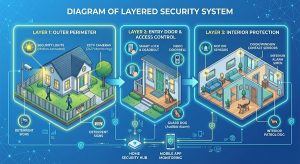
Can you use smart home security with a guard dog? Yes, and the two work better together. Your dog detects intent, deters, and physically blocks. Smart tech records, alerts you remotely, and calls for help when you can’t be there. The main problem is false alarms, because most “pet-immune” sensors only ignore pets up to about 40 to 88 lbs. For big guard breeds, combine dual-technology sensors, high angled mounting, AI person detection on cameras, and solid obedience training.
Table of Contents
- Why a dog plus smart tech beats either one alone
- What your dog does best vs. what tech does best
- The false alarm problem (and why big breeds break the rules)
- Sensor and camera placement: a step-by-step guide
- Cameras, doorbells and two-way audio: train the dog, not just the device
- Smart locks, geo-fencing and GPS collars
- Smart tech that protects your dog
- Privacy and hacking: protect the system and the dog
- Common mistakes
- A trainer’s 30-day rollout plan
- FAQs
- Final thoughts
Introduction
You bought a security dog to protect your home. Then you bought a smart system to protect it even more. Now your phone buzzes 40 times a day because your dog walked past the hallway sensor.
Sound familiar?
Most guides tell you to “buy pet-immune sensors” and stop there. That advice falls apart when your dog is a 90-pound German Shepherd, a Rottweiler or a Boerboel. It also ignores the other half of the job, which is training your dog to live around this gear.
In this guide, you’ll learn:
- What dogs do better than tech, and what tech does better than dogs
- Why “pet-immune” sensors fail with big breeds, and how to fix it
- Exactly where to place sensors and cameras
- How to train your dog around doorbells, two-way audio and cameras
- How to keep your dog safe with smart devices, and your system safe from hackers
- A 30-day rollout plan
1. Why a Dog Plus Smart Tech Beats Either One Alone
Let’s start with what burglars say, because they’re the experts here.
A University of North Carolina at Charlotte study interviewed 422 incarcerated burglars in three US states. Researchers found that alarm signs, alarms, dogs inside and outdoor cameras were all things burglars weighed when choosing a target. Reports on the same study say about 83% of burglars tried to find out whether an alarm was present, and around 60% said an alarm would push them toward a different target. The same research found 41% described burglary as a spur-of-the-moment event, so visible deterrents matter a lot.
An investigative report in Oregon surveyed 86 burglars. Its conclusion was that most would stay away from a home with a big, loud dog.
So both layers deter. Here’s the catch: neither is perfect. Burglars sometimes bring treats to distract a dog, and a determined one may ignore the barking. Alarms can’t physically stop anyone, and a dog can’t call the police or record a face.
That’s why I tell every owner the same thing: stack the layers. A visible camera and alarm sign stop many people at the fence. A loud dog stops many more at the door. And if someone still gets in, you have footage, an alert and a dog.
2. What Your Dog Does Best vs. What Tech Does Best
| Job | Dog | Smart tech |
|---|---|---|
| Sensing intent and behavior | Excellent, reads body language and scent | Weak, only sees motion and shapes |
| Deterring at a distance | Strong (sound, size) | Strong (visible cameras, signs, lights) |
| Physically stopping someone | Yes, with training | No |
| Alerting you when you’re away | Only if you’re home to hear | Yes, instantly |
| Recording evidence | No | Yes |
| Calling for help | No | Yes (monitored systems) |
| Working through a power cut | Yes | Only with battery backup |
| Never gets tired | No, dogs need rest | Yes |
Think of your dog as the brain at the scene and the tech as your eyes and phone when you’re not there.
3. The False Alarm Problem (and Why Big Breeds Break the Rules)
Ever wonder why your sensor treats your dog like a burglar?
Most motion sensors use passive infrared (PIR). They detect heat moving across zones. A running dog creates a lot of heat movement, so older or cheap sensors trigger easily.
“Pet-immune” sensors fix this with weight and size thresholds. Here’s the problem: those thresholds are small.
- Many standard pet-immune sensors ignore pets up to about 40 to 45 lbs.
- Some adjustable models reach 55 lbs (Vivint’s sensors, for example, max out near that).
- Honeywell’s IS335 reaches 80 lbs.
- A DSC PowerG microwave-PIR model lists up to 88 lbs.
Now compare that with typical guard breeds. German Shepherds often run 50 to 90 lbs, Rottweilers can pass 100 lbs, and Boerboels and Cane Corsos can go well beyond that. Your dog doesn’t fit inside the rating.
Why the “weight rating” isn’t the whole story
These sensors don’t weigh your dog. They use lens design and zone placement to ignore low-level movement. That has two big consequences:
- The “pet alley.” Most pet-immune sensors leave the bottom two to four feet of the room largely ignored. A dog walking through is fine. A big dog that jumps on the couch, stands on its hind legs or climbs stairs enters the sensor’s active zone.
- Mounting matters more than the rating. Install too low, and a big dog stands inside the detection zone.
The fix for large guard breeds
Use this order. It works better than just buying a higher rating.
- Choose dual-technology sensors. These combine PIR with microwave detection and need both to agree before an alarm triggers. That cuts false alarms sharply.
- Mount high. Check your sensor’s manual. Many specify about 6 to 7.5 feet. Don’t mount in a spot your dog can reach by jumping onto furniture.
- Aim away from favorite spots. Don’t point sensors at the sofa, stairs, water bowl or the dog’s bed.
- Avoid windows and heat sources. Sunlight, heaters and vents create heat changes that confuse PIR.
- Consider door and window contact sensors as your main layer. They don’t care how big your dog is. They only trigger when something opens.
- Use “home/stay” arming modes. When you’re home with your dog, arm only the perimeter (doors and windows) and disable interior motion.
- Use cameras with AI person detection in rooms where sensors still trigger.
If you have two or more big dogs, treat the sensor rating as unreliable. Rely on perimeter sensors and cameras, not interior motion.
4. Sensor and Camera Placement: A Step-by-Step Guide
Before you drill any holes, spend one week watching your dog. Most false alarms happen in the evening, so check your system’s activity log and note times and locations.
Follow these steps:
- Map your dog’s routes. Note the path from bed to water bowl to door. Mark favorite sleeping spots.
- Place perimeter sensors first. Doors and windows at ground level come first.
- Mount interior motion sensors in corners, high, aiming across the room rather than down at the floor.
- Cover entry points with cameras. Front door, back door, garage and any side gate.
- Put outdoor cameras where a dog can’t chew cables or knock them over. Many working dogs also chew. Keep wiring out of reach.
- Test with your dog. Arm the system and let your dog move normally for an hour. Check the log.
- Adjust and repeat.
Most pet-immune sensor guides also recommend keeping sensors a good distance from places pets can climb. One brand’s guidance says Vivint sensors should sit at least six feet from areas pets can reach.
Quick tip: Place a smart light or siren near the door. Light and sound together make a visible warning, and that’s what most opportunists respond to.
5. Cameras, Doorbells and Two-Way Audio: Train the Dog, Not Just the Device
This is the section most guides skip, and it’s where owners create new problems.
Smart doorbells and chimes
If your dog goes crazy every time the doorbell rings, you’ve trained a reflex, not an alert. A guard dog needs to tell the difference between “someone is at the door” and “someone is a threat.”
Try this:
- Record or use your doorbell chime at low volume.
- Play it and reward your dog for staying calm.
- Raise the volume slowly over several sessions.
- Add a command like “Quiet” or “Place” once your dog stays calm.
- Practice with real visitors, using a helper.
The goal isn’t a silent dog. It’s a dog who alerts once, then listens to you.
If you haven’t built those commands yet, start with our guide to basic protection commands for family dogs.
Two-way audio
Talking to your dog through a camera can calm them down. Here’s how to do it without confusing them:
- Use short, firm commands your dog already knows. Say “Place” and “Quiet,” not “Hey buddy, what’s going on?”
- Keep your tone the same as at home.
- Reward the behavior when you return. Dogs link commands to outcomes.
- Don’t overuse it. If you talk constantly, your voice stops meaning anything.
Some dogs get more excited hearing a voice with no person attached. Test it while you’re home first. Stand in another room and use the app.
Bark alerts: what exists and what doesn’t
Bark detection is a pet-camera feature, not a standard security-camera feature. Pet cameras such as Furbo, and some from eufy, can notify you when your dog barks. Reviewers note that general security cameras like Nest or Ring usually lack dog-specific features such as bark alerts. Note that Furbo’s most useful features sit behind a paid subscription, while some eufy models offer local storage with no monthly fee.
A guard dog’s bark carries real information. Keep a bark alert on a camera in the room your dog guards. Then use the audio clip to learn what triggers your dog: a delivery driver, a neighbor, a cat or something else.
AI person detection
Switch on person detection for doorbells and outdoor cameras. It means a stray cat or your own dog won’t flood your phone, while real people still trigger alerts.
6. Smart Locks, Geo-Fencing and GPS Collars
Smart locks
Auto-lock features help in two ways. They secure the door when you leave, and they stop your dog from pushing a badly latched door open and leaving.
Two cautions:
- Never let a dog be the only thing between a locked door and a keypad. If power or Wi-Fi fails, keep a physical key backup.
- Give people with legitimate access a plan. A smart lock that opens for a dog walker, a relative or a neighbor needs a clear entry routine. Your dog needs to know that person is safe before they enter. Introduce them first.
Geo-fencing
Geo-fencing uses your phone’s location to trigger actions. Good uses include:
- Lock the doors when the last person leaves.
- Turn on cameras and arm the system when you’re gone.
- Switch to “home” mode when you return.
GPS collars
A GPS collar with a virtual boundary tells you if your dog leaves your property. Accuracy, battery life and subscription costs vary a lot between devices, so read our guide to choosing the right tracker for your dog before you buy.
Platforms like Home Assistant or IFTTT can connect a collar alert to other devices. For example, a boundary breach could turn on outside lights.
7. Smart Tech That Protects Your Dog
Your dog protects you. Now return the favor.
- Temperature sensors. Dogs overheat fast in a closed house. Set alerts if the temperature goes above or below a safe range for your breed and coat.
- Smart thermostats. Keep a stable temperature while you’re away.
- Smoke and carbon monoxide alarms with mobile alerts. A dog can’t open a window. Monitored alarms reach you or emergency services when you can’t.
- Water leak sensors. These protect your dog from flooding near the kennel or crate.
- Smart feeders. Keep meal times consistent. Working dogs thrive on routine.
- Battery backup. Power cuts are common in many places. A small UPS or battery backup keeps the router, cameras and hub running.
- Motion-activated lights. Help your dog move safely at night and add a visible deterrent.
8. Privacy and Hacking: Protect the System and the Dog
Smart devices add a risk that dogs don’t have: hackers.
Do these things:
- Use a strong, unique password for every device and account.
- Turn on two-factor authentication.
- Update firmware regularly. Outdated software is a common weak point.
- Use a separate Wi-Fi network for smart devices.
- Consider local storage cameras if you don’t want footage in the cloud.
- Choose encrypted wireless sensors for the main system.
- Disable voice assistant commands that unlock doors or disarm alarms, or require a PIN.
Also check local laws. Audio recording and camera placement rules vary by country, state and even between neighbors. Don’t point cameras at neighbors’ windows. This isn’t legal advice, so check the rules where you live.
And a note on signs: a “Beware of Dog” or camera sign is a deterrent, but laws on liability for dog bites vary widely. Check local rules.
9. Common Mistakes
- Trusting the weight rating. It doesn’t account for jumping, standing or two dogs.
- Mounting sensors too low. Height is your best false-alarm filter.
- Skipping obedience work. Tech can’t fix a dog who barks at everything.
- Too many notifications. Alert fatigue makes you ignore the one that matters.
- No battery backup. The system fails when you need it.
- Leaving cameras on default passwords.
- Assuming the dog replaces the alarm. A dog can be distracted, poisoned or outsmarted. An alarm adds a second layer.
- Ignoring maintenance. Clean lenses, check batteries and update firmware every month.
For gear that fits into this setup, see our list of the top tactical K9 gear for working dogs.
10. A Trainer’s 30-Day Rollout Plan
Don’t install everything in one weekend. Your dog needs time to adjust.
Week 1: Observe and plan
- Map your dog’s routes and favorite spots.
- Review the activity log if you have a system.
- Fix obedience gaps, especially “Quiet” and “Place.”
Week 2: Install the perimeter
- Fit door and window sensors and the outdoor camera.
- Turn on person detection.
- Introduce each device calmly, with treats.
Week 3: Add interior coverage
- Mount motion sensors high.
- Test with your dog for a few days.
- Adjust angles and sensitivity.
Week 4: Train and refine
- Practice doorbell desensitization.
- Test two-way audio.
- Set up alerts and review the log.
- Add temperature and smoke alerts.
After day 30, review monthly. Dogs change habits, and furniture moves.
11. Frequently Asked Questions
1. Can I use a pet-immune motion sensor with a large guard dog?
Sometimes, but don’t rely on the weight rating. Many sensors only cover up to about 40 to 88 lbs. For large breeds, use dual-technology sensors, mount them high, aim them away from your dog’s favorite spots, and use door and window sensors as your main layer.
2. Do dogs deter burglars better than alarms?
Both help, and neither is perfect. In the UNC Charlotte study of 422 burglars, alarms and cameras were weighed more often than dogs, though dogs were still a factor. The best approach combines a visible alarm or camera with a loud, well-trained dog.
3. Will two-way audio confuse my security dog?
It can at first. Use short, familiar commands in your normal tone, and test it while you’re home before relying on it when you’re away.
4. Do security cameras detect dog barking?
Some pet cameras do, including Furbo and certain eufy models. General security cameras from brands like Nest or Ring usually don’t offer dog-specific bark alerts. Check which features need a paid subscription before you buy.
5. How do I stop my dog from barking at every doorbell chime?
Desensitize gradually. Play the chime at low volume, reward calm behavior, raise the volume over several sessions, then add a “Quiet” or “Place” command. Practice with a helper before real visitors.
12. Final Thoughts
Smart tech doesn’t replace a trained guard dog. A dog senses intent, deters in person and can physically intervene. Tech records, alerts and calls for help when you can’t.
The best setup uses both: perimeter sensors and cameras on the outside, a well-trained dog at the door, and dual-tech sensors mounted high inside. Add dog-safety alerts, strong passwords and a battery backup.
Your next steps:
- Watch your dog’s habits for a week.
- Start with door and window sensors.
- Mount motion sensors high, or skip them if you have a giant breed.
- Train your dog around chimes and two-way audio.
- Check your system monthly.
Want more tips like this? Subscribe to our weekly articles roundup newsletter and get new guides straight to your inbox.
If you want the training foundation behind all of this, my book, Beyond the Bark: Inside a Pro Handler’s Playbook for Raising the Ideal Dog, walks you through obedience, structure and consistency step by step.
Also, if you’re still choosing a dog, see our guide to the top 7 guard protection dogs for family safety.
What smart device made the biggest difference in your home? Tell us in the comments.
Disclosure note: Sensor weight ratings and camera features change by model, so check the current specs before you buy.

Her work centres on obedience, detection, protection and operational readiness. She favours proven methods built on repetition, consistency and real-world conditioning, so that both dogs and handlers are prepared for high-pressure tasks.
Rofiat represented the Nigerian Army Dog Centre at the Nigerian Army Day Celebration (NADCEL) 2026, where she led demonstrations in obedience, explosive detection, agility and tactical movement. Through articles, training content and documentaries, she shares field-based insight into how structured training, clear communication and trust between handler and dog affect performance and reliability.
She is the author of Beyond the Bark: Inside a Pro Handler's Playbook for Raising the Ideal Dog, a practical guide that helps dog owners and handlers apply professional training principles in everyday situations.
- Dog Agility Course Layout: Easy DIY Setup - October 7, 2026
- Local Dog Breeds: Temperament, Health & Training Guide - October 6, 2026
- How Long Do Military Working Dogs Serve? Full Guide - October 5, 2026